
Blog
December 4, 2025

While Apache Kafka is powerful "out of the box," simply deploying a cluster and hoping for the best is rarely a winning strategy. Achieving optimal Kafka performance requires a deep understanding of its event-driven architecture as well as a commitment to ongoing maintenance. Otherwise, your data infrastructure risks becoming a bottleneck rather than an accelerator.
In this blog, we'll take a look at Kafka anti-patterns to avoid, the delicate balance between throughput and latency, the necessity of rigorous profiling, and modern cluster configuration strategies involving KRaft. However, there's only so much we can cover in one article; if you need more Kafka performance tuning guidance, talk to an expert at OpenLogic who can review the specifics of your environment.
Back to topKafka Anti-Patterns to Avoid
In the context of Kafka performance tuning, an "anti-pattern" is a common habit or configuration choice that seems logical during initial setup but actively degrades system health as you scale. Here's a video followed by a summary of the three most common anti-patterns we have come across with customers at OpenLogic:
Using Kafka as a Data Store
Kafka isn't a database, so it should not be treated like a long-term data store. New users often disable data retention policies, intending to keep a permanent record of all events. While Kafka is durable, it is designed for streaming, not infinite storage.
Disabling data retention maximizes disk usage and drastically slows down recovery times. When a broker restarts, it must rebuild its state from the logs. If those logs stretch back indefinitely, recovery can take hours instead of minutes. Kafka should transport data to dedicated storage systems (e.g., PostgreSQL, MongoDB, data lakes) rather than trying to replace them.
Topic Explosion
Teams sometimes use a single topic for every specific use case or microservice, such as separate topics for user-created, user-updated, and user-deleted. While this offers granular control, it creates massive overhead. Each topic partition consumes resources on the broker.
A better approach is multi-tenancy based on business domains. For example, a single UserEvents topic can handle all user-related actions, with consumers filtering for the specific event types they need. This consolidates resource usage and simplifies cluster management.
Partition Misconfiguration
Unfortunately, architects frequently over-partition topics in anticipation of future scale. The logic is that adding partitions later is difficult, so they create hundreds upfront.
Why is this a problem? Excessive partitions increase unavailability during broker failures. If a broker goes down, the controller must elect new leaders for all partitions hosted on that node. If that number is in the thousands, the sheer volume of metadata updates can, in extreme cases, freeze the cluster for significant periods, or at the very least make general housekeeping tasks like consumer group rebalancing extremely expensive. Furthermore, high partition counts add significant latency to the replication process, undermining overall Kafka performance.
Get more insights into Kafka partition strategy >>
Back to topBalancing Throughput vs. Latency
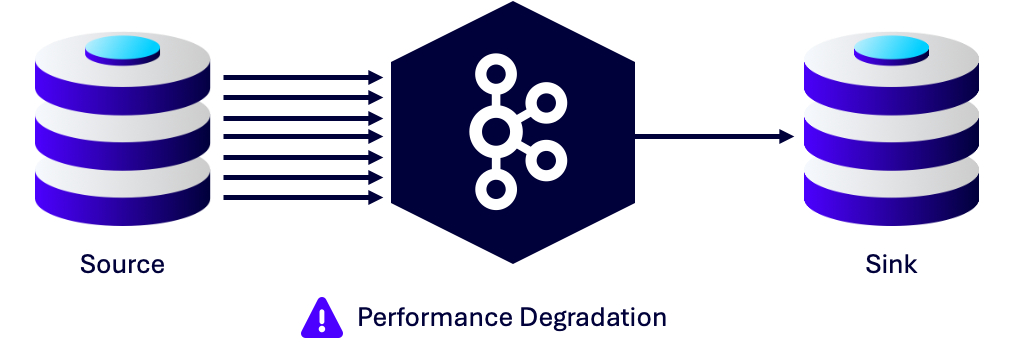
When tuning Kafka performance, you are almost always balancing two competing metrics: throughput and latency. Throughput refers to the volume of data pushed through the pipe, while latency is the time it takes for a single message to traverse that pipe.
Generally, optimizing for one comes at the expense of the other. High throughput usually requires batching multiple messages together to reduce network overhead. However, holding messages back to fill a batch inherently introduces latency.
Tuning the Producer
The producer configuration is your primary control center for this balancing act. Two settings are paramount:
batch.size: This controls the maximum size of data (in bytes) the producer will buffer before sending a request to the broker. Larger batches reduce the number of network requests, improving throughput.linger.ms: This setting acts as the time-based trigger for sending a batch. It tells the producer to wait a specific number of milliseconds for more records to arrive before sending the batch.
If you require low latency, set linger.ms to 0 (or a very low number). If you need to maximize throughput, increase linger.ms to allow batches to fill up.
Knowing Your Data
You cannot effectively tune these settings without understanding your traffic patterns. For example, the default batch.size is often 16KB. If your average message size is 4MB, your producer will never batch anything; it will send every message individually, regardless of your linger.ms setting. You must align your configuration with the actual shape and size of your data to see any benefit.
On-Demand Webinar
Kafka Gone Wrong: How to Avoid Data Disasters
In this on-demand webinar, get insights into implementation pitfalls and learn how to assess your cluster health and identify issues before they become showstoppers.
Profiling is Non-Negotiable
You cannot fix what you cannot measure. Kafka performance tuning is impossible without granular visibility into your system's capabilities. Many organizations set up Grafana dashboards but fail to implement actionable alerting rules. Seeing a spike in a graph is useful, but receiving an alert when a specific threshold is breached allows for proactive remediation.
To get a clear picture of broker health, you need to go beyond high-level metrics.
- JMX Tools: Java Management Extensions (JMX) provide low-level insights into the broker's JVM performance, including heap usage and thread activity.
- OS-Level Intelligence: Kafka relies heavily on the filesystem. Monitoring disk I/O, page cache usage, and CPU steal time is critical for identifying hardware bottlenecks.
You also need to validate performance and configuration changes in a testing environment that mirrors production volume. If your production environment handles 50,000 messages per second, testing on a laptop with 50 messages per second will yield useless data. You do not necessarily need a 1:1 hardware replica, but you must maintain a valid ratio. For instance, if your test environment has 50% of the production capacity, push it to 50% of the production load to get accurate performance baselines.
Back to topModernize Your Kafka Implementation
In this section, we'll look at how continuing to utilize ZooKeeper and certain deployment decisions can hinder your Kafka performance.
ZooKeeper vs. KRaft
The architecture of Kafka itself is evolving. Previously, Kafka relied on Apache ZooKeeper for cluster coordination and metadata management. However, this dependency has been phased out in favor of KRaft (Kafka Raft Metadata mode).ZooKeeper adds an external dependency that can become a bottleneck. When ZooKeeper infrastructure is shared with brokers or other systems, resource contention can lead to instability. In extreme cases, "split-brain" scenarios occur where the cluster metadata gets out of sync. Furthermore, ZooKeeper limits the scalability of partitions because all metadata must be loaded into the controller's memory.
ZooKeeper was marked deprecated in Kafka 3.5 and is completely gone in Kafka 4.0. Organizations running on older architectures should begin planning their Kafka migration now. If you can't migrate before EOL, Kafka long-term support can extend your runway.
KRaft removes the ZooKeeper dependency entirely. Instead of an external system, metadata is stored on Kafka KRaft controllers within a special metadata topic using the Raft consensus protocol for leader elections.
This architecture is significantly more efficient. It allows for faster controller failovers and supports a much larger number of partitions per cluster. By simplifying the deployment model, KRaft reduces operational complexity and improves overall stability.
Whitepaper
The Enterprise Guide to Apache Kafka
This in-depth Apache Kafka guide is for both IT leaders and enterprise practitioners who are interested in leveraging the power of Kafka at scale, with guidance on how to successfully implement, optimize, and secure Kafka deployments.
Running Kafka in Containers Without Orchestration
It may be tempting to grab the latest Kafka image off of Bitnami and charge off to the races. And in some cases, like prototyping and PoCs, this approach may make sense. However, problems arising from a lack of orchestration will be become readily apparently as you rollout into integration and production environments. Using an orchestration tool like Kubernetes will save a ton of headaches in the long run.
For those deploying Kafka on Kubernetes, using the Strimzi operator is the superior method for managing these modern configurations. Strimzi allows you to define your cluster using YAML manifests, enabling a GitOps approach to infrastructure that is far more reliable than manual management.
It's also worth adding that while it might not be exactly an anti-pattern and some organizations may have good reason to do so, deploying Kafka on bare metal or virtual machines (VMs) is a lot more cumbersome than deploying to Kubernetes with the Strimzi operator. Any organization that already has a mature Kubernetes implementation will find deploying and maintaining their Kafka cluster with Strimzi vastly superior to deploying them on bare metal or VMs.
Back to topKafka Performance Is a Marathon, Not a Sprint
Achieving a high-performing Kafka cluster is not a one-time setup task — it is an ongoing process of observation and adjustment. By avoiding common Kafka anti-patterns like topic explosions and shifting toward modern architectures like KRaft, you build a foundation that can withstand the demands of enterprise scale.
Remember that your data traffic will change over time. The tuning parameters that work today may be insufficient tomorrow. Regularly audit your partition strategies, review your producer configurations, and ensure your profiling tools are giving you the truth about your system's health.
If you suspect your Kafka environment is underperforming, or if you need assistance navigating the migration away from ZooKeeper, expert guidance from OpenLogic can prevent minor inefficiencies from turning into data loss or downtime. Watch the video below for details on some of the customers we've helped over the years.
Additional Resources
- On-Demand Webinar - Kafka on K8s: Lessons From the Field
- Blog - 8 Kafka Security Best Practices
- Guide - Enterprise Kafka Resources
- Blog - Solving Complex Kafka Issues: OpenLogic Case Studies
- Blog - Apache Kafka vs. Confluent Kafka
- Whitepaper - Decision Maker's Guide to Apache Kafka